Is your HRMS built for the business you run today, or the one you might become?
Choosing HRMS features for Indian SMEs usually starts with a list of everything the software can do. It should start with a usage question instead: which of these features did your team open last month?
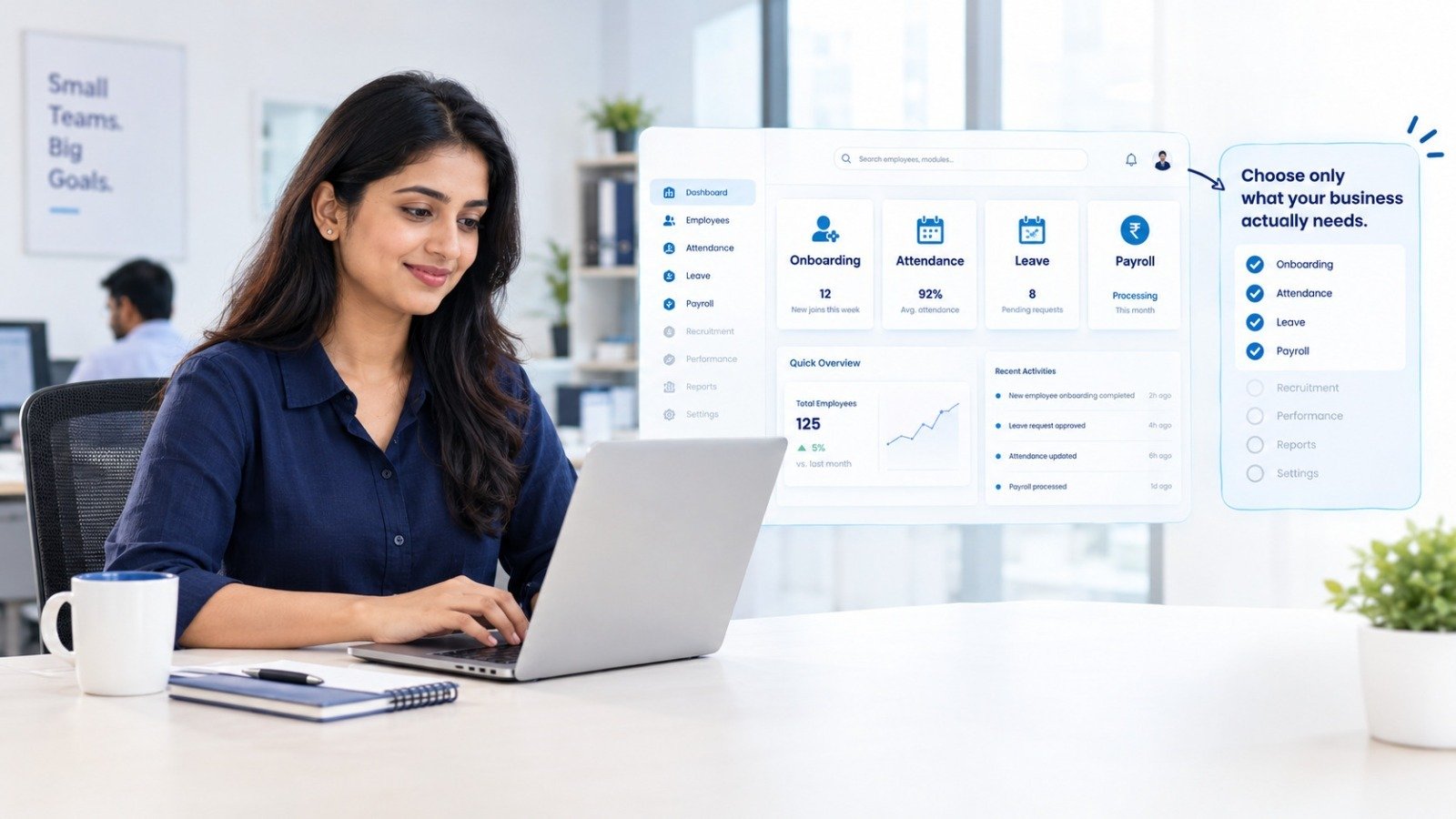
There is no single feature set that fits every Indian SME. In practice, the monthly work sits in a small core — onboarding, leave, attendance and payroll — with statutory compliance alongside payroll wherever the company files PF, ESI or professional tax itself. That core is the floor, not the answer. What you add above it, from performance management to recruitment to training, depends on how much of that work your team actually does and how complex your workforce is.
Many Indian SMEs pay for features nobody opens. It rarely comes down to a bad decision. The vendor quotes a bundle, the demo shows every module, and the founder picks a plan that will still fit when the company has twice as many people. A year later, a good part of that plan sits idle. The industry has a word for it: shelfware — software that is licensed, implemented and never used.
In the HR reviews our team runs with SME clients, the same pattern keeps appearing. The modules that go quiet are rarely the ones doing daily work. They are the ones bought for a stage the company had not reached yet: performance management before there was a review cycle, recruitment before hiring became continuous, training before anyone owned it. Attendance, leave and payroll are opened every day — and they still cause most of the month-end pain when they are configured badly.
Not every SME ends up here. A 60-person company with three shifts and four sites may need more configuration than a 150-person company in one office. The complexity of the workforce matters more than the headcount.
Why do growing Indian SMEs end up paying for HRMS features they rarely use?
Many SMEs select a plan based on anticipated growth rather than current operational requirements. Four things push them there.
Some vendors only sell modules as a bundle, so a company that wants payroll ends up paying for performance management too. Demos go through every feature, and the full package starts to look like the normal starting point. Founders buy for the headcount they expect next year rather than the payroll they run this month. And without a periodic usage review, nobody notices the gap until renewal — when migration, training and implementation costs make switching harder.
Vendors can explain what their platform does. Only you can say whether that capability matches your workflows, your policies and what your team does every month.
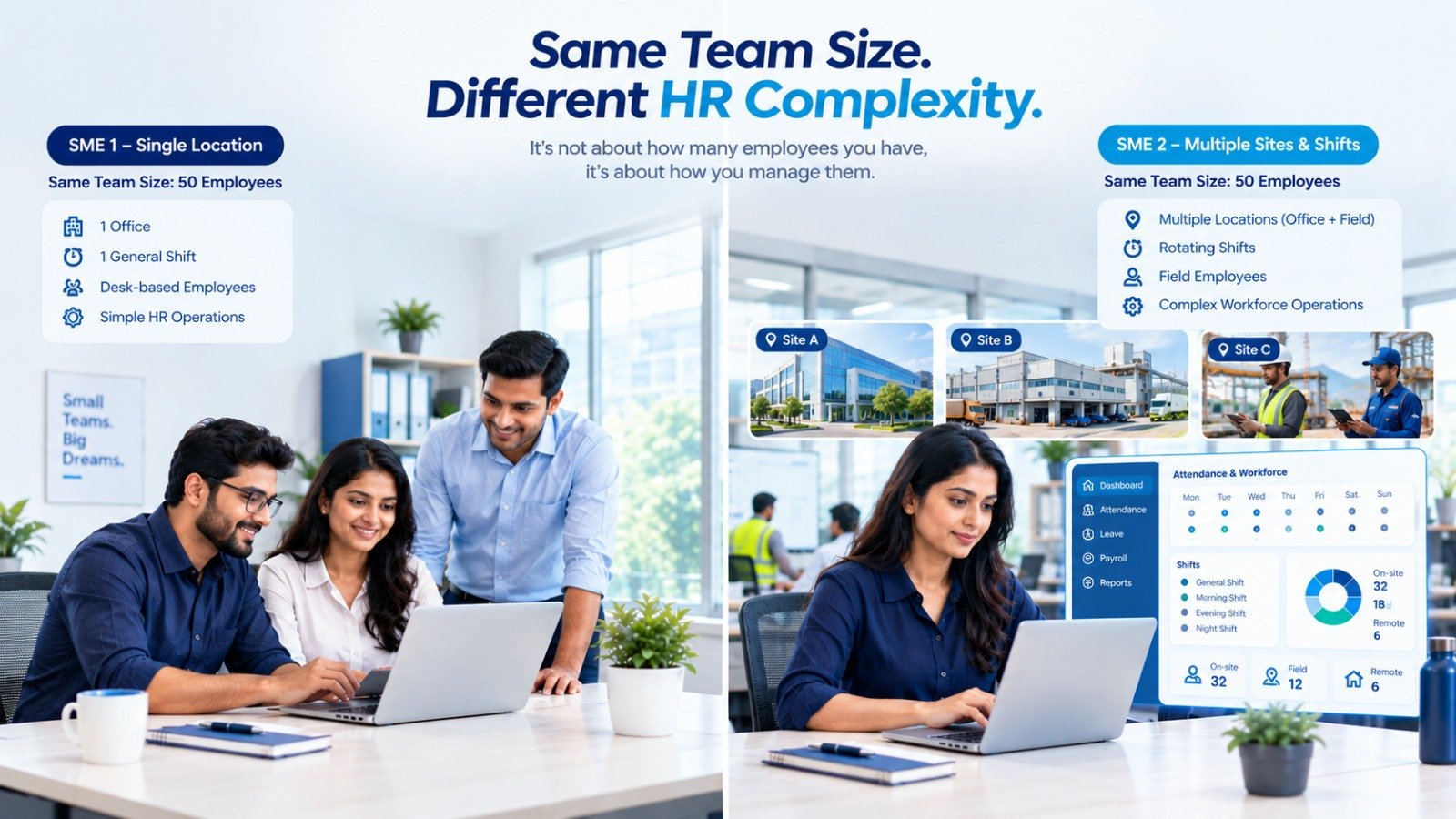
Does a 90-employee company need the same HRMS as a 900-employee company?
No. The right HRMS depends on workforce structure, operating locations, shift patterns and payroll complexity, not on employee count alone.
Take two companies with 90 employees each. One has a single office, one general shift and fixed monthly salaries. It needs attendance, leave and payroll that work, and very little else. The other has four sites, rotating shifts, field staff who mark attendance from client locations, overtime rules, and contract workers paid by the day. That company needs shift rules, location-based attendance and flexible pay components — and it will use them every month.
A 900-person company is not a different species. It usually has more of the same problems: several legal entities, layers of approval, a compliance calendar that varies by site, and payroll that has to reconcile across locations. The core modules do not change. What changes is governance — who approves what, how exceptions are handled, and how much configuration the system has to carry.

What do unused HRMS features actually cost a business?
More than the monthly fee. Each module has to be configured and tested, and someone has to train users on it and keep it current even when nobody uses it much.
Three things get confused here, and the distinction matters when you audit. An unused licence is a seat you pay for that nobody uses — a duplicate account, a user who has left, or a name added just in case. An unused module is one that sits in your plan with no activity: either never switched on, or switched on and abandoned. An infrequently used feature is different again. Full and final settlement, annual appraisal, the bonus run — these can sit idle for months and be entirely justified, because the process they support happens once or twice a year.
Only the first two are waste. A module that arrives bundled at no extra cost and is never used is not a billing problem — it is a training and complexity problem, and still worth taking out of the next demo.
The arithmetic is simpler than the invoices make it look, and it has three parts: the share of the licence that pays for modules with no activity, the setup fee already spent on them, and the hours your team spends each month keeping them current. Take a company on a ₹2,40,000 annual subscription, as an example. If a quarter of the licence — ₹60,000 — covers modules with no activity over the last three months, that is ₹60,000 a year before the setup fee and the admin hours. Both figures are illustrative, not a market rate. The ratio is what matters: if a quarter of the bill buys nothing, that is the conversation to have before renewal.
The first thing we ask for in a review is the usage report, not the contract. A contract tells you what you are entitled to. Usage tells you what you are getting.
The larger cost arrives at renewal. A team that has spent a year with dormant modules has also built its month-end around a system it may not want to keep. Switching then means migration, retraining and a parallel run — so most companies renew rather than right-size. That is why the decision belongs 90 days before renewal, not after it.
How do you run an HRMS utilisation assessment?
A utilisation assessment is a half-day exercise, not a consulting project. Five steps, in this order.
1. Pull the module-level usage report for the last 90 days. Logins and transactions, not just user counts — a module can have active users and no work.
2.Match each module to the process it supports and how often that process runs. Monthly payroll and annual appraisal need different baselines, so judge each against its own cadence.
3.Split seats into active users, provisioned accounts and leavers. Duplicate and dormant accounts are the cheapest thing to fix.
4.Price the gap: the share of the subscription with no activity, the setup already spent on it, and the hours your team spends each month on those modules.
5.Take the list to renewal. Reduce seats, remove or downgrade a module, and check the notice period before you sign anything.
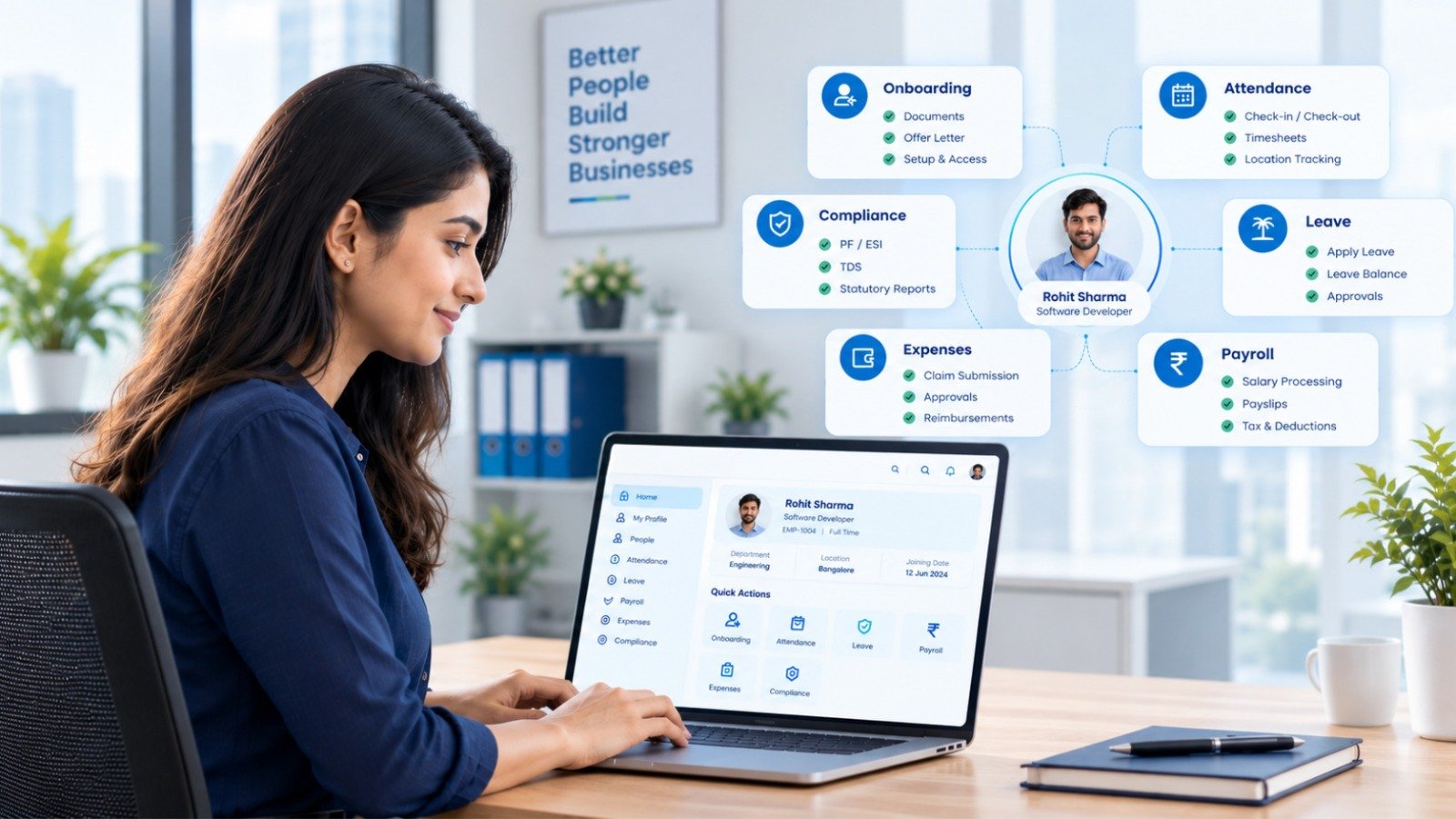
Which HRMS capabilities matter most in everyday HR operations?
For most SMEs, the daily work sits in attendance, leave, payroll and onboarding, supported by reliable data sharing across modules. Statutory compliance — PF, ESI, professional tax, TDS — is a function those modules have to serve, whether it arrives as a separate module or as part of payroll.
Onboarding creates the employee record. Attendance and leave record what happened during the month. Payroll uses both to calculate pay, and expense claims get added on top. When these modules share consistent employee data, authorised updates flow across relevant processes, reducing duplicate entry and the risk of discrepancies.
Here is how that shows up in practice, and where the month-end pain usually starts. A salary revision during the month may require payroll to calculate earnings using the applicable rates for each period; the final figure depends on the effective date, company policy and payroll configuration. If the joining date is entered differently in onboarding and in leave, accrual and loss-of-pay days can come out differently. A missed punch approved after the payroll cut-off may be recovered as an arrear in the next cycle, depending on policy. Offices in different states follow different holiday lists, and weekly-off patterns vary by site, so even the count of working days changes.
Well-integrated core HR functions, with clear workflows and an interface people actually use, do more for an SME than a long feature list.
What should SMEs check before buying or renewing an HRMS?
Start with how your team works today and test the software against that. The same checklist works at demo stage and again at renewal, where the questions change from capability to utilisation and terms.
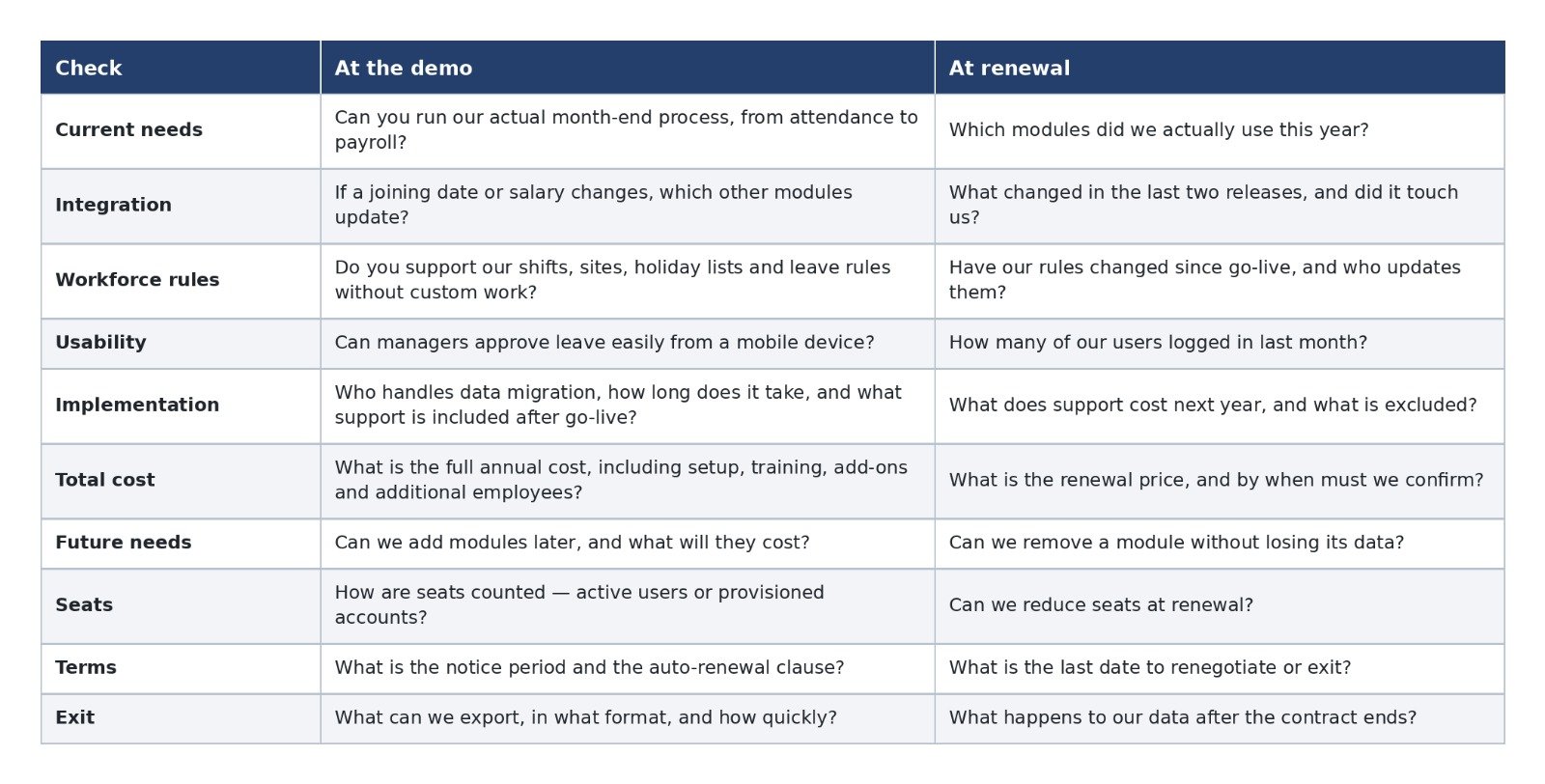
If you are still shortlisting, the longer version of the first column sits in our guide to choosing an HRMS for your Indian SME. If you are deciding whether you need one at all, the statutory thresholds that force the decision are covered separately.
How can growing businesses choose an HRMS that supports their next stage?
Choose one that meets your current requirements and offers a clear, costed path to adding capability later.
Look for modules that share one employee record. Read what each plan includes, line by line. Ask whether extra modules can be added without moving your data — and whether they can be removed without losing it. A company can start with the core and add more when a real need shows up; that is the argument for a modular system over a bundle.

What does HR leadership add to an HRMS?
Most HRMS vendors sell a product and a support ticket. The decisions that determine whether the system works — how leave rules, shifts, salary structures and statutory obligations are configured — are left to the buyer, or to a product specialist working through a checklist.
ABStart begins from the other end. It was built and incubated inside TalentCo HR Services, an HR consulting and solutions firm, by founder Shailendra Dhamdhere and a leadership team with more than three decades of experience across people operations, payroll, compliance and organisational advisory. More than 100 growing companies already work with TalentCo on people, payroll, compliance and advisory.
So you are not only buying modules. The people who configure leave rules, shifts and salary structures come from that HR practice — they have run payroll, managed statutory compliance and written leave policies — rather than only from a product helpdesk. That is the most practical defence against over-buying too: someone who has run a 90-person month-end can tell you, before you sign, that performance management can wait a year.
ABStart itself brings the core functions together on one platform: onboarding, leave, attendance, expenses, payroll and compliance. The SME plan starts at ₹99 per employee per month for that core set, and the final cost depends on your headcount, the modules and the support you add — a 60-person company with three shifts is not quoted the same way as a 200-person company in one office.
Key takeaways
1. Start from the work, not the list. The core is onboarding, leave, attendance and payroll — a floor, not a complete answer. Workforce complexity decides what sits above it.
2.Three different things. An unused seat, an unused module and an occasional feature are three different problems, and only two are waste.
3.Measure before you renegotiate. Audit usage once, before renewal, using the usage report rather than the contract.
4.Add on evidence. Buy the core first and add modules when the work arrives, not when the roadmap says so.
Frequently asked questions
Is an HRMS worth it for a 50-employee company?
Usually, but not because of the subscription. At 50 people the subscription is rarely the line item that hurts; a payroll error, a late PF deposit or a compliance notice is. What decides it is whether the system replaces recurring manual work — attendance, leave and payroll — and whether the modules you buy match how your team actually works.
How much does an HRMS cost for an Indian SME?
Headline rates are usually quoted per employee per month, but the number that matters is the annual quote for your headcount and module set. Ask for a scoped quote that includes setup, support and any per-employee minimum, then compare totals rather than headline rates. ABStart’s SME plan starts at ₹99 per employee per month for the core set.
What is HRMS shelfware, and how do I find it before renewal?
Shelfware is software you license, implement and never use. Find it with a module-level usage report: list every module you pay for, the last date anyone logged in, and the process it supports. Anything with no activity in 90 days, and no process on your calendar that needs it, is either waiting to be switched on or unnecessary.
Do Indian SMEs need performance management and recruitment modules?
Only when the work is continuous. Performance management earns its place when there is a review cycle with goals and ratings; recruitment when hiring never really stops. Before that, they add configuration and training without changing a month-end. If a bundle includes them at no extra cost, the question is whether they are worth the admin time, not the licence.
Make every HRMS investment count
The value of an HRMS depends on how well its capabilities align with your business processes, workforce requirements and budget.
Before the next renewal or expansion, write down what your team uses every month and what was never switched on. Note what is still done in Excel. Then compare that list with your current plan.
Want to see how your everyday HR workflows could work on one platform? Book a free ABStart HRMS demo and evaluate attendance, leave and payroll against your business requirements.
References and further reading
[1] ABStart HRMS — module set and plan structure: https://talentcohr.com/abstart/
[2] TalentCo HR Services, Payroll Compliance in India for SMEs: https://talentcohr.com/payroll-compliance-in-india-for-smes/
[3] TalentCo HR Services, Statutory Thresholds for Indian SMEs: https://talentcohr.com/statutory-thresholds-sme-hrms-india/
TalentCo HR Services LLP is an HR consulting and solutions company offering services across HR operations, compliance, payroll management, and HR technology through its proprietary platform ABStart. This article is for general information only; plan details and pricing may change, so confirm current information on the ABStart page. Verify current regulations or consult a qualified professional before making business decisions.